
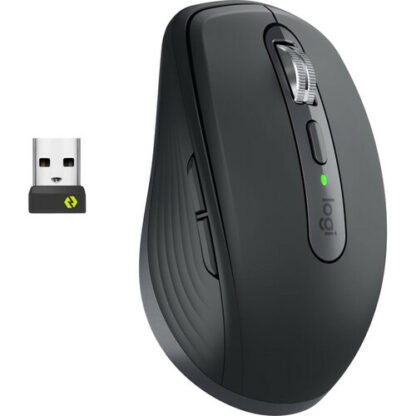
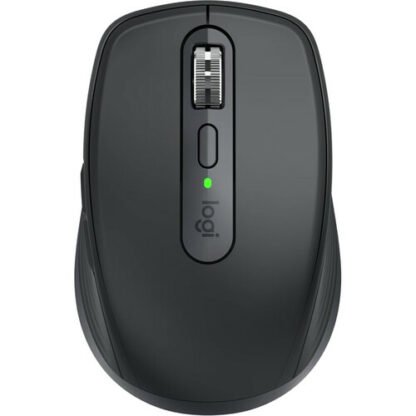
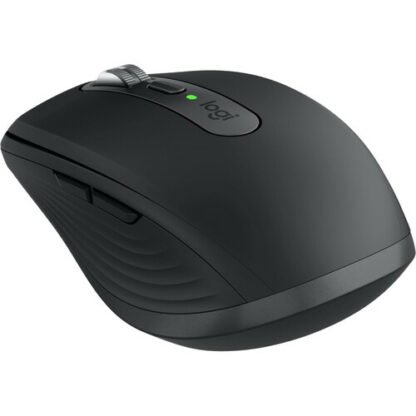
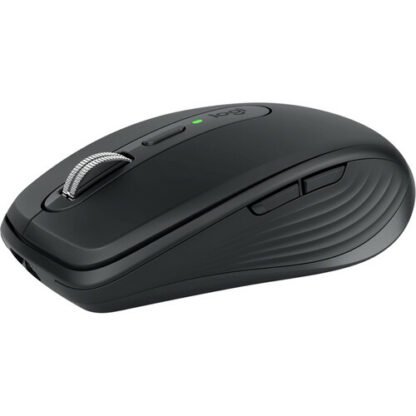
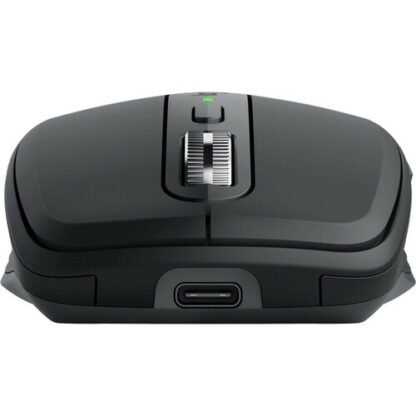

Logitech MX Anywhere 3S Wireless Mouse | 8K DPI, MagSpeed Scroll, Compact | Kenya
KSh13,500
Key Features
- Bluetooth Connectivity
- 200 to 8000 dpi Darkfield Sensor
- 6 x Quiet Click Buttons
- MagSpeed Scroll Wheel
- 70-Day Battery Life
- Sculpted, Compact Shape
- Right-Handed Design
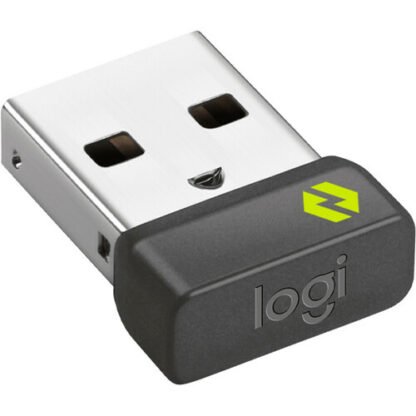
- Supports Logi Bolt Receiver
- Logi Options+ Compatible
- Multiplatform Support
Introduction
The Logitech MX Anywhere 3S Mouse Kenya is not just another mouse; it’s a revolution in how you interact with your devices. Designed for professionals and creatives alike, this mouse combines cutting-edge technology with sleek design to enhance your productivity. With an increasing number of Kenyans working remotely and engaging in freelance opportunities, having the right tools is essential for success. This guide will provide you with an in-depth understanding of the Logitech MX Anywhere 3S Mouse, its features, and how it can elevate your daily computing experience.
In a market flooded with various mouse options, knowing what sets the Logitech MX Anywhere 3S Mouse Kenya apart is crucial. This guide dives deep into its specifications, benefits, and how to select the right model for your needs. Whether you are a student, a business professional, or a creative, this guide matters because it will help you make an informed decision that aligns with your lifestyle and budget.
What is Logitech MX Anywhere 3S Mouse?
The Logitech MX Anywhere 3S Mouse is a compact, high-performance wireless mouse designed for versatility and portability. It caters to users who require a reliable and efficient tool for various tasks, whether at home, in the office, or on the go. This mouse is equipped with Logitech’s advanced technology, ensuring a seamless experience across multiple devices, including laptops, tablets, and desktops.
Market-wise, the Logitech MX Anywhere 3S Mouse Kenya stands out due to its ergonomic design and customizable features. The mouse is engineered to fit comfortably in your hand, reducing strain during prolonged use. With a focus on the Kenyan market, it’s important to note that as the demand for remote work tools increases, the need for high-quality peripherals like the MX Anywhere 3S is also growing. This mouse is available in local stores, priced at approximately KSh 13,500, making it a premium but accessible option for many consumers.
As of 2025, the MX Anywhere 3S has gained popularity among professionals, students, and creatives in Kenya, with many praising its ability to enhance productivity and comfort during extended use. The increased adaptability to various work environments, coupled with its stylish design, makes it a sought-after accessory in the Kenyan tech market.
Key Features and Benefits
The Logitech MX Anywhere 3S Mouse comes packed with features that cater to the needs of modern users. Here’s a detailed breakdown:
1. Advanced Optical Tracking
With a tracking speed of up to 8,000 DPI, the MX Anywhere 3S ensures precise cursor control on various surfaces, including glass. This feature is particularly beneficial for Kenyan users who may work in diverse environments, such as cafes, co-working spaces, or even outdoor settings. The high DPI allows for smooth navigation, whether you’re working on detailed design projects or simply browsing the web.
2. Multi-Device Connectivity
This mouse can connect to up to three devices simultaneously via Bluetooth or the Logitech Unifying Receiver. You can easily switch between devices with the touch of a button, enhancing multitasking capabilities. This is especially useful for Kenyans who juggle multiple devices for work and personal use, allowing for seamless transitions between a laptop, tablet, and desktop without the need to disconnect and reconnect.
3. Ergonomic Design
The contoured shape fits comfortably in your hand, which is essential for those who spend long hours working. The design helps to reduce fatigue and strain, making it ideal for freelancers and remote workers in Kenya. The MX Anywhere 3S is designed to promote a natural hand position, which can lead to improved comfort and efficiency during extended use.
4. Customizable Buttons
With customizable buttons, you can tailor the mouse to fit your workflow. Whether you need shortcuts for design software or quick access to frequently used applications, the MX Anywhere 3S adapts to your needs. This feature is particularly advantageous for professionals in Kenya who rely on specific software tools for their work, as it allows for enhanced efficiency and productivity.
5. Fast Charging and Long Battery Life
The mouse offers a fast-charging feature, providing up to 70 days of use on a full charge. This is particularly advantageous for users who are always on the move and cannot afford downtime. A quick one-minute charge can give you up to three hours of use, making it ideal for busy professionals who need to maximize their productivity without worrying about battery life.
6. Flow Technology
Logitech Flow allows you to control multiple computers seamlessly. You can drag and drop files between devices, making collaboration easier, especially for teams working remotely. This feature is particularly useful for Kenyans working in collaborative environments, as it simplifies the process of sharing information and resources across different devices.
Overall, the Logitech MX Anywhere 3S Mouse Kenya is designed to enhance productivity, providing users with the tools they need to work efficiently and effectively. Its combination of advanced features and ergonomic design makes it a top choice for anyone looking to elevate their computing experience.
Models and Variants
The Logitech MX Anywhere 3S Mouse is available in various colors and configurations to suit different preferences. Here are the notable options:
- Color Variants: The mouse is available in Graphite, Pale Gray, and Rose, allowing users to choose a style that matches their aesthetic. This variety enables Kenyans to select a mouse that complements their personal style or office decor.
- Connectivity Options: Users can opt for Bluetooth connectivity or use the Logitech Unifying Receiver, which is included in the package. This flexibility is crucial for users who may have different connectivity needs across their devices.
- Special Editions: Occasionally, Logitech releases limited edition models, which may feature unique designs or additional functionalities. Keeping an eye out for these special editions can provide users with exclusive options that stand out.
When considering the Logitech MX Anywhere 3S Mouse Kenya, it’s essential to choose a variant that aligns with your personal style and connectivity needs. This ensures that you not only have a functional tool but one that also reflects your personality.
How to Choose the Right One
Selecting the right mouse can significantly impact your productivity and comfort. Here are some crucial factors to consider when choosing the Logitech MX Anywhere 3S Mouse:
1. Purpose of Use
Identify your primary use case. Are you using it for design work, general office tasks, or gaming? The MX Anywhere 3S is versatile, but understanding your needs will guide your decision. For instance, if you are a graphic designer, the high precision and customizable features can greatly enhance your workflow.
2. Ergonomics
Consider how the mouse fits in your hand. If you have larger hands or prefer a specific grip style, ensure the MX Anywhere 3S feels comfortable during extended use. Ergonomics play a vital role in preventing strain and discomfort, especially for those who spend hours at their desks.
3. Connectivity Preferences
Decide whether you prefer Bluetooth or using a USB receiver. If you often switch between devices, the ability to connect to multiple devices will be a significant advantage. This flexibility allows for a more streamlined workflow, especially for users with various devices.
4. Customization Needs
If your work involves specific software, check if the customizable buttons can be programmed to enhance your workflow. This feature is particularly useful for designers and video editors who require quick access to tools and shortcuts.
5. Budget Considerations
At KSh 13,500, the Logitech MX Anywhere 3S Mouse Kenya is a premium product. Assess your budget and consider how this investment will benefit your productivity in the long run. While it may seem like a significant expense, the durability and features can justify the cost.
6. Local Availability
Ensure that the model you want is available in local stores or online platforms in Kenya. This can save you time and potential shipping costs. Checking local retailers can also provide insights into any ongoing promotions or discounts.
By considering these factors, you can confidently choose the Logitech MX Anywhere 3S Mouse that best fits your lifestyle and work requirements.
Pros and Cons
Like any product, the Logitech MX Anywhere 3S Mouse Kenya has its strengths and weaknesses. Here’s a balanced assessment:
Pros:
- High Precision: The advanced optical sensor provides exceptional tracking on various surfaces, making it ideal for both office and outdoor use. This versatility is particularly beneficial in diverse work environments.
- Multi-Device Support: The ability to connect to three devices simultaneously is a game-changer for multitaskers. This feature is especially useful for professionals in Kenya who manage multiple devices for work.
- Customizable Features: Tailoring buttons to your specific needs can significantly enhance productivity, allowing for a more personalized user experience.
- Long Battery Life: The fast-charging capability means less downtime, keeping you productive throughout the day. This is crucial for busy professionals who cannot afford interruptions.
- Portable Design: Its compact size makes it easy to carry, perfect for professionals on the go. The lightweight design ensures that it can be easily slipped into a laptop bag.
Cons:
- Price Point: At KSh 13,500, it may be considered expensive for budget-conscious consumers. However, the investment can pay off in terms of enhanced productivity and comfort.
- Learning Curve: For users unfamiliar with customizable features, it may take time to fully utilize its capabilities. This can be a barrier for some users who prefer straightforward functionality.
- Limited Gaming Features: While it is versatile, serious gamers may prefer a dedicated gaming mouse. The MX Anywhere 3S is not specifically designed for gaming, and dedicated gaming mice often offer features tailored for that purpose.
Understanding these pros and cons will help you make an informed decision regarding the Logitech MX Anywhere 3S Mouse Kenya.
vs Top Competitors
When considering the Logitech MX Anywhere 3S Mouse, it’s essential to compare it with its top competitors in the market:
1. Razer Basilisk X Hyperspeed
The Razer Basilisk X is a gaming-oriented mouse that offers customizable buttons and a high DPI range. However, it lacks the multi-device connectivity feature, making the MX Anywhere 3S a better choice for professionals who switch between devices frequently. The Basilisk X is more suited for gaming enthusiasts who prioritize performance and speed.
2. Microsoft Surface Mouse
While the Microsoft Surface Mouse is sleek and designed for Windows users, it does not offer the same level of customization and tracking precision as the MX Anywhere 3S. The Surface Mouse is also less portable due to its larger size, which can be a drawback for users who need a mouse that is easy to transport.
3. Logitech M720 Triathlon
The Logitech M720 Triathlon is another multi-device mouse but lacks the advanced optical tracking and fast charging features of the MX Anywhere 3S. While it is more budget-friendly, it may not meet the needs of users requiring high precision and performance. The M720 is a solid choice for casual users but may fall short for professionals seeking advanced features.
In conclusion, while there are various alternatives available, the Logitech MX Anywhere 3S Mouse Kenya stands out for its blend of features tailored for productivity, making it a worthwhile investment for serious users. The combination of advanced technology, ergonomic design, and multi-device functionality makes it a top contender in the market.
Tips for Maximum Value
To get the most out of your Logitech MX Anywhere 3S Mouse, consider these tips:
- Customize Settings: Take the time to customize button functions to suit your workflow. This will significantly enhance your productivity and make your work processes more efficient.
- Regular Software Updates: Keep the Logitech Options software updated to ensure you have the latest features and bug fixes. Regular updates can provide new functionalities that enhance your mouse experience.
- Charge Wisely: Use the fast-charging feature to keep your mouse powered up. A quick charge can provide hours of use, ensuring you stay productive without interruptions.
- Use on Various Surfaces: Take advantage of the advanced optical sensor by using the mouse on different surfaces, including glass, to see its full potential. This versatility can enhance your work experience in various environments.
- Protect Your Investment: Consider using a mouse pad to protect the mouse’s underside and improve tracking performance. A good mouse pad can also enhance comfort during extended use.
By following these tips, you can maximize the value of your Logitech MX Anywhere 3S Mouse Kenya and ensure it meets your productivity needs. The right care and usage can prolong the life of your mouse and enhance your overall experience.
Frequently Asked Questions
1. Is the Logitech MX Anywhere 3S Mouse suitable for gaming?
While the MX Anywhere 3S is not specifically designed for gaming, its high precision and customizable buttons can make it suitable for casual gaming. However, serious gamers may prefer a dedicated gaming mouse with features tailored for that purpose, such as adjustable DPI settings and programmable macros.
2. Can I use the MX Anywhere 3S with my tablet?
Yes, the Logitech MX Anywhere 3S Mouse Kenya can connect to tablets via Bluetooth, making it a versatile option for users who switch between devices. This feature is particularly useful for those who use tablets for both work and leisure.
3. How long does the battery last?
The mouse offers up to 70 days of use on a full charge, and a quick 1-minute charge can provide up to 3 hours of use, which is ideal for busy professionals. This long battery life reduces the frequency of charging sessions, allowing you to stay focused on your tasks.
4. Does it work on glass surfaces?
Yes, the advanced optical tracking technology of the MX Anywhere 3S allows it to work smoothly on glass surfaces, making it perfect for various environments. This feature is particularly beneficial for users who may work in cafes or other locations with glass tables.
5. Can I customize the buttons?
Absolutely! The mouse features customizable buttons that can be programmed through the Logitech Options software to suit your specific needs. This feature allows you to streamline your workflow and improve efficiency by assigning shortcuts to frequently used functions.
6. What is Logitech Flow?
Logitech Flow is a feature that allows you to control multiple computers with a single mouse. You can seamlessly move your cursor between devices and even drag and drop files, enhancing your multitasking capabilities. This feature is particularly useful for professionals who work across different devices and need to share information quickly.
7. Where can I buy the Logitech MX Anywhere 3S Mouse in Kenya?
The Logitech MX Anywhere 3S Mouse Kenya is available in various electronics stores and online platforms across Kenya. Be sure to check for local retailers for the best prices and availability. Online platforms may also offer promotions or discounts that can help you save on your purchase.
8. How do I maintain my Logitech MX Anywhere 3S Mouse?
To maintain your mouse, regularly clean the surface to prevent dust and grime buildup. Avoid exposing the mouse to extreme temperatures or moisture, and store it in a protective case when not in use. Keeping the mouse updated with the latest software can also enhance performance and longevity.
Final Verdict
In summary, the Logitech MX Anywhere 3S Mouse Kenya is a powerful tool designed for modern users who value precision, comfort, and versatility. Its advanced features make it suitable for various tasks, from office work to creative projects. While it comes at a premium price of KSh 13,500, the benefits it offers in terms of productivity and efficiency make it a worthwhile investment.
If you’re looking for a high-quality mouse that adapts to your lifestyle and enhances your workflow, the Logitech MX Anywhere 3S Mouse should be at the top of your list. Don’t miss out on the opportunity to elevate your computing experience—purchase the Logitech MX Anywhere 3S Mouse Kenya today and witness the difference it can make!
Alternative Products
- Logitech M171 Wireless Mouse | 10m Range, Plug & Play | Kenya - KSh2,000
- Logitech G305 Gaming Mouse | Hero Sensor, Ultra-Light | Kenya - KSh10,000
- Logitech M350 Wireless Mouse | Silent Clicks, Bluetooth, Compact | Kenya - KSh5,500
- Logitech M221 Wireless Mouse | Compact, Silent Clicks | Kenya - KSh3,500
- Logitech MX Master 3S Wireless Mouse | 8K DPI, Multi-Device | Kenya - KSh17,500
Related products
Reviews
There are no reviews yet.