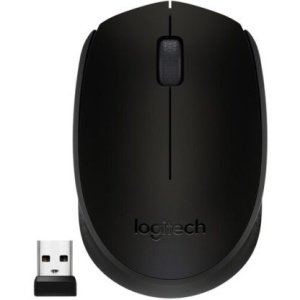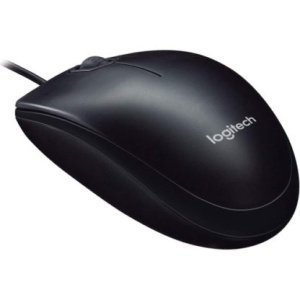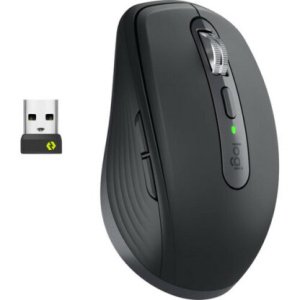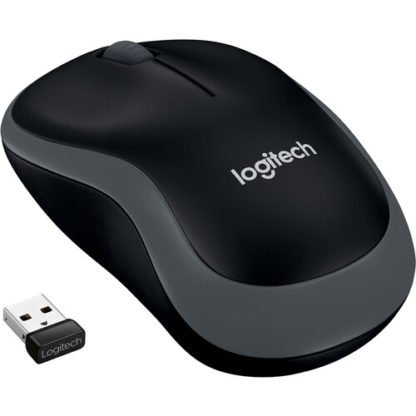
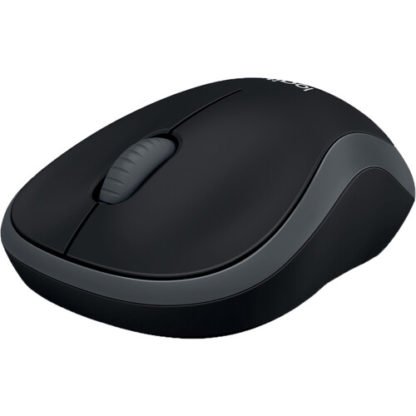
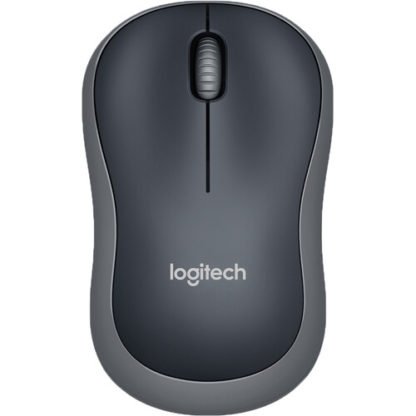
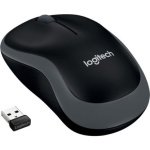
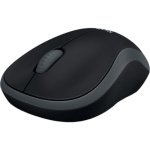
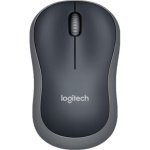
Logitech M185 Wireless Mouse | Plug & Play, 12-Month Battery Life | Kenya
KSh 2,800.00
Key Features
- Plug-and-Play Wireless USB Receiver
- Wireless Via the 2.4GHz Band
- Scroll Wheel with Right & Left Buttons
- Comfortable With Either Hand
- 12-Month Battery Life
Introduction
Are you searching for a reliable and efficient mouse that enhances your computing experience? Look no further than the Logitech M185 Wireless Mouse in Kenya. In today’s digital age, having the right peripherals can significantly impact your productivity and comfort. Whether you’re a student, a professional, or simply someone who enjoys browsing the web, the right mouse can make all the difference.
This guide aims to provide you with a comprehensive overview of the Logitech M185 Wireless Mouse. We will delve into its features, benefits, and the various models available. Understanding these aspects will help you make an informed decision when purchasing a mouse that suits your needs. Additionally, we’ll discuss how to choose the right one for your specific use case, compare it with competitors, and provide tips for maximizing your investment. With a price point of KSh 2800, the Logitech M185 Wireless Mouse is a premium product that promises to deliver quality and performance while catering specifically to the Kenyan market.
What is Logitech M185 Wireless Mouse?
The Logitech M185 Wireless Mouse is a wireless optical mouse designed for both comfort and functionality. It features a compact design that fits comfortably in your hand, making it an ideal choice for extended use, whether at home, in the office, or on the go. The mouse operates on a 2.4 GHz wireless connection, providing a reliable link to your computer without the hassle of tangled cords.
Logitech is a well-known brand in the peripherals market, recognized for its commitment to quality and innovation. The Logitech M185 Wireless Mouse is no exception, offering users a seamless experience with its plug-and-play functionality. This means you can simply insert the USB receiver into your computer, and you’re ready to go—no complicated setup required.
In a market where consumers are increasingly looking for value without compromising on quality, the Logitech M185 Wireless Mouse stands out. Its affordability, combined with reliable performance, makes it a popular choice among Kenyan consumers who want a dependable mouse for everyday tasks.
Key Features and Benefits
1. Wireless Connectivity
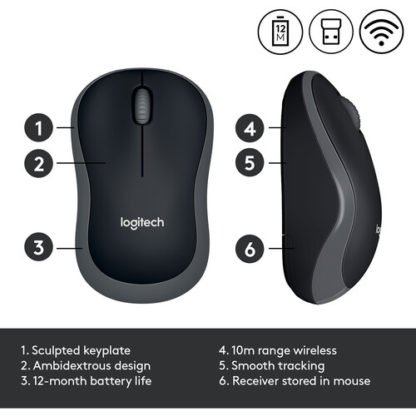
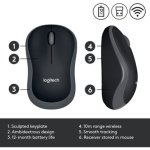
The Logitech M185 Wireless Mouse utilizes a 2.4 GHz wireless connection, which offers a robust and interference-free signal. This feature allows for a clutter-free workspace, as you won’t have to deal with cables that can become tangled or damaged. The wireless range extends up to 10 meters, giving you the freedom to move around without being tethered to your computer. This is especially beneficial in open office environments or during presentations where mobility is key.
2. Comfortable Design
Designed with ergonomics in mind, the Logitech M185 Wireless Mouse fits naturally in your hand. Its contoured shape ensures that you can use it for extended periods without discomfort. This is particularly beneficial for professionals and students in Kenya who spend hours working on projects or studying. The design also accommodates various grip styles, whether you prefer a palm grip or a claw grip, making it versatile for different users.
3. Long Battery Life
One of the standout features of the Logitech M185 Wireless Mouse is its impressive battery life. With up to 12 months of use on a single AA battery, you can say goodbye to frequent battery changes. This is especially advantageous for users in Kenya, where access to batteries may not always be convenient. Additionally, the battery life indicator helps you keep track of when it’s time to replace the battery, ensuring you’re never caught off guard.
4. Plug-and-Play Simplicity
Setting up the Logitech M185 Wireless Mouse is incredibly straightforward. Simply plug the USB receiver into your computer, and it will automatically connect. This ease of use is perfect for those who may not be tech-savvy or for anyone who simply wants to get started quickly. The mouse is also compatible with a variety of operating systems, including Windows, macOS, and Linux, making it a versatile choice for different users.
5. High Precision Tracking
The optical tracking technology used in the Logitech M185 Wireless Mouse ensures smooth and accurate cursor control on various surfaces. Whether you’re working on a wooden desk, a glass table, or even a fabric surface, this mouse provides consistent performance, making it suitable for various environments. This high precision tracking is crucial for tasks that require accuracy, such as graphic design or detailed document editing.
6. Affordable Price Point
At KSh 2800, the Logitech M185 Wireless Mouse is priced competitively in the Kenyan market. It offers excellent value for money, especially considering its features and performance. This makes it an attractive option for students and professionals alike who are looking for quality without breaking the bank. Furthermore, its affordability allows users to invest in additional peripherals without exceeding their budget.
Models and Variants
The Logitech M185 Wireless Mouse is available in several colors and designs, allowing you to choose one that matches your personal style or workplace aesthetics. While the specifications remain consistent across models, the visual appeal can be a deciding factor for many users.
- Logitech M185 Black – A classic choice that suits any environment.
- Logitech M185 Red – A vibrant option for those who prefer a pop of color.
- Logitech M185 Blue – A cool and trendy color that appeals to younger users.
- Logitech M185 Graphite – A sleek and professional look for business settings.
Each of these models offers the same reliable performance, ensuring that you can find a mouse that not only works well but also fits your personal style. Additionally, the availability of multiple colors allows users to express their individuality, making it a fun choice for personal use.
How to Choose the Right One
When selecting the right mouse, particularly the Logitech M185 Wireless Mouse, there are several factors to consider:
- Usage Purpose: Determine what you will primarily use the mouse for. If you are a gamer, you might need a different type of mouse. However, for everyday tasks such as browsing, document editing, or online classes, the M185 is ideal. Its design is optimized for productivity rather than gaming, making it perfect for office or home use.
- Ergonomics: Comfort is key, especially for long hours of use. The M185’s design is comfortable for most hand sizes, but it’s always good to try it out if possible. Consider how it feels in your hand and whether it supports your wrist adequately.
- Portability: If you frequently travel or work in different locations, consider the size and weight of the mouse. The M185 is compact and lightweight, making it easy to carry in a laptop bag. This feature is particularly useful for students and professionals who are always on the move.
- Battery Life: The M185 boasts up to 12 months of battery life. If you prefer a mouse that requires minimal maintenance, this is a significant selling point. Longer battery life means less hassle, especially in areas where batteries might not be readily available.
- Budget: At KSh 2800, the M185 is competitively priced. Ensure that it fits within your budget while still meeting your needs. Consider the overall value it provides in terms of features and durability.
By evaluating these criteria, you can make an informed decision that aligns with your specific requirements, ensuring you get the most out of your purchase.
Pros and Cons
Pros
- Affordability: Priced at KSh 2800, it offers great value for money.
- Comfortable Design: Ergonomically designed for prolonged use, reducing the risk of strain during long sessions.
- Long Battery Life: Up to 12 months on a single battery, minimizing maintenance.
- Plug-and-Play: Easy setup with no software installation required, making it user-friendly.
- Reliable Wireless Connection: No interference and a range of up to 10 meters, providing flexibility and freedom.
Cons
- No Advanced Features: Lacks additional buttons or customizable settings that some users may desire for gaming or specialized tasks.
- Basic Design: While the design is functional, it may not appeal to users looking for a more stylish or high-tech appearance, particularly in a competitive market where aesthetics can play a significant role.
Overall, the pros of the Logitech M185 Wireless Mouse significantly outweigh the cons, making it a solid choice for most users. Its blend of comfort, battery life, and ease of use positions it well in the market.
Comparison with Top Competitors
When considering the Logitech M185 Wireless Mouse, it’s essential to compare it with similar products in the market to see how it stacks up:
1. HP Wireless Mouse X3000
The HP Wireless Mouse X3000 is another popular option priced similarly to the M185. It offers a comfortable design and good battery life, but the Logitech M185 has a slightly longer battery life and a more reliable wireless connection. Additionally, users often report that the Logitech model feels more responsive and accurate, particularly during extended use.
2. Dell WM126 Wireless Mouse
The Dell WM126 is a budget-friendly alternative that competes closely with the M185. While it is affordable, users often report that the M185 has a more comfortable grip and better tracking precision. The Dell model may also lack some of the ergonomic features that make the M185 a favorite among users who prioritize comfort during long hours of use.
3. Microsoft Wireless Mobile Mouse 1850
This mouse is a direct competitor in terms of pricing and features. The Microsoft Wireless Mobile Mouse 1850 is equally portable but lacks the extended battery life of the Logitech M185, making the latter a more appealing choice for users who prioritize longevity. Additionally, the Logitech M185’s design is often noted as being more comfortable for prolonged use.
In summary, while there are several alternatives available, the Logitech M185 Wireless Mouse consistently outperforms many competitors in terms of comfort, battery life, and ease of use, making it a top choice for consumers in Kenya.
Tips for Maximum Value
To get the most out of your Logitech M185 Wireless Mouse, consider the following tips:
- Regular Cleaning: Keep your mouse clean to maintain optimal performance. Use a soft cloth to wipe down the surface regularly, and consider using compressed air to remove dust from the crevices.
- Battery Management: Turn off the mouse when not in use to conserve battery life. This simple step can extend the life of your single AA battery significantly. Additionally, consider using rechargeable batteries to reduce waste and save costs over time.
- Surface Considerations: Use the mouse on a suitable surface to enhance tracking accuracy. A mouse pad can improve performance on uneven or reflective surfaces, providing a smoother experience and better precision.
- Update Drivers: Occasionally check for driver updates on the Logitech website to ensure your mouse operates smoothly with your computer. Updated drivers can enhance functionality and compatibility with new software.
- Storage: If you’re traveling, consider using a small pouch or case to protect the mouse from damage. This will help maintain its aesthetic and functional quality.
By following these tips, you can enhance the longevity and performance of your Logitech M185 Wireless Mouse, ensuring you get the best value for your investment.
Frequently Asked Questions
1. Is the Logitech M185 Wireless Mouse compatible with all operating systems?
Yes, the Logitech M185 Wireless Mouse is compatible with various operating systems, including Windows, macOS, and Linux. It uses a standard USB receiver, making it universally compatible with most devices. This feature is particularly beneficial for users who switch between different operating systems.
2. How do I connect the Logitech M185 Wireless Mouse to my computer?
Connecting the Logitech M185 Wireless Mouse is simple. Just plug the USB receiver into an available USB port on your computer. The mouse will automatically connect, and you can start using it right away. There is no need for additional software installation, making it user-friendly for all levels of tech-savviness.
3. What is the battery life of the Logitech M185 Wireless Mouse?
The Logitech M185 Wireless Mouse boasts an impressive battery life of up to 12 months on a single AA battery, depending on usage. This means less frequent battery changes for you, which is particularly advantageous in a market like Kenya, where battery availability can be inconsistent.
4. Can I use the Logitech M185 Wireless Mouse on a glass surface?
Yes, the optical tracking technology used in the Logitech M185 Wireless Mouse allows it to work on various surfaces, including glass. However, using a mouse pad can enhance tracking performance, especially on reflective surfaces, providing a smoother experience.
5. Does the Logitech M185 Wireless Mouse come with a warranty?
Yes, the Logitech M185 Wireless Mouse typically comes with a limited warranty, ensuring that you are covered for any manufacturing defects or issues that may arise during normal use. Be sure to keep your purchase receipt for warranty claims.
6. Is the Logitech M185 Wireless Mouse suitable for gaming?
While the Logitech M185 Wireless Mouse is primarily designed for everyday tasks and office use, it may not have the advanced features required for serious gaming. For casual gaming, it can suffice, but dedicated gaming mice offer better performance, including customizable buttons and higher DPI settings.
7. How does the Logitech M185 Wireless Mouse compare to other Logitech mice?
When compared to other Logitech models, the Logitech M185 Wireless Mouse offers a balance of affordability and functionality. While higher-end models may provide additional features like programmable buttons and RGB lighting, the M185 excels in providing basic functionality at an attractive price point. This makes it an excellent choice for users who do not require advanced features but still want a reliable mouse.
Troubleshooting Guide
If you encounter issues with your Logitech M185 Wireless Mouse, here are some common problems and solutions:
- Mouse Not Responding: Ensure that the USB receiver is properly connected to the computer. Try unplugging and re-plugging it into a different USB port. If the mouse still does not respond, check the battery and replace it if necessary.
- Intermittent Connection: If the mouse connection drops intermittently, try moving closer to the USB receiver to ensure a strong signal. Additionally, check for any electronic devices nearby that may interfere with the wireless signal.
- Cursor Jumps or Lag: This could be due to a dirty sensor. Clean the sensor located on the bottom of the mouse with a soft cloth. Also, ensure you are using the mouse on a suitable surface.
- Battery Issues: If you find the battery life is significantly shorter than expected, consider using high-quality batteries or rechargeable options. Additionally, ensure that the mouse is turned off when not in use to conserve battery life.
Final Verdict
In conclusion, the Logitech M185 Wireless Mouse is an excellent choice for anyone in need of a reliable, comfortable, and affordable mouse. Its combination of wireless convenience, ergonomic design, and long battery life makes it suitable for various users, from students to professionals. At KSh 2800, it offers great value for money, ensuring that you do not compromise on quality while staying within budget.
Whether you’re working from home, attending online classes, or simply browsing the internet, the Logitech M185 Wireless Mouse can enhance your experience. Don’t miss out on the opportunity to upgrade your computing setup with this fantastic product. Visit our store today and make your purchase to enjoy a seamless and efficient computing experience!
Alternative Products
- Logitech M720 Wireless Mouse | Hyper-Fast Scrolling, Multi-Device | Kenya - KSh 7,500.00
- Logitech M220 Wireless Mouse | Quiet Operation, Portable | Kenya - KSh 4,000.00
- Logitech M350 Wireless Mouse | Silent Clicks, Bluetooth, Compact | Kenya - KSh 5,500.00
- Logitech M650 Wireless Mouse | Multi-Device, SilentTouch | Kenya - KSh 6,500.00
- Logitech Ergo M575 Ergonomic Mouse | Wireless Trackball, Comfort Design | Kenya - KSh 8,500.00
Related products