


Magic Mouse 3 USB C-C
KSh 12,810.00
Key Features
- Weight: 99g
- Controls: multi-touch surface
- Gestures: supported
- Connectivity: Wireless
- Battery: Several weeks on full charge
- Charging: woven USB-C to Lightning Cable
- Colours: Black, White
Magic Mouse 3 USB C-C Review by Cytech Digitals: Pros, Cons & Features
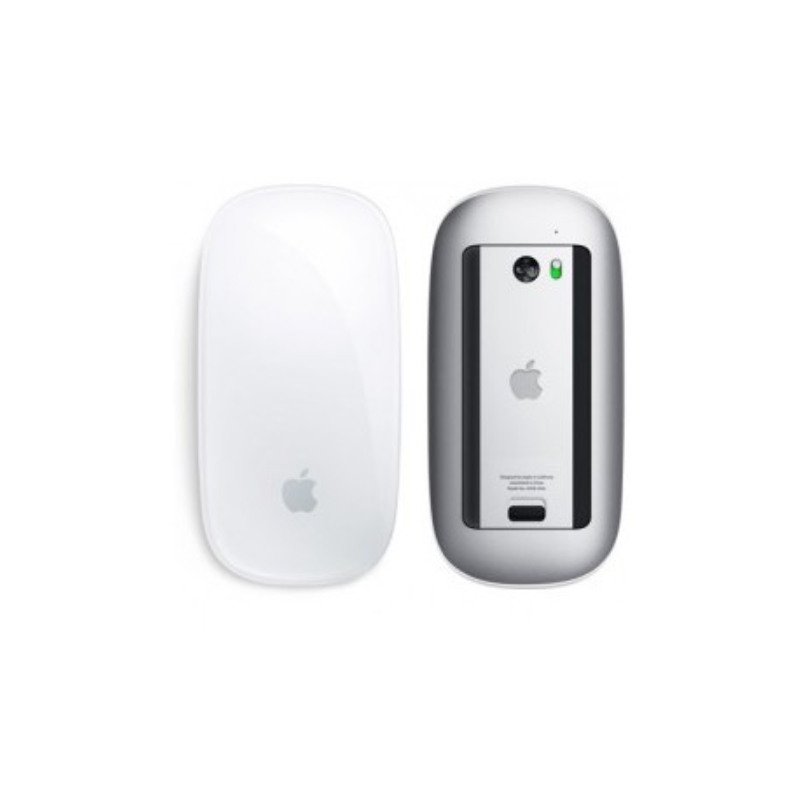
The Magic Mouse 3 is a state-of-the-art wireless and rechargeable mouse that features a multi-touch surface designed for gesture control. Apple’s Magic Mouse 3 is engineered with an optimized foot design that allows it to glide effortlessly across various surfaces, making it an excellent choice for both casual users and professionals alike. It pairs automatically with your Mac or iPad, ensuring a seamless experience, and comes with a woven USB-C to Lightning cable for charging. This mouse is compatible with a broad range of Apple devices and boasts a sleek, ergonomic design that enhances user comfort during extended use.
Unique Features of the Magic Mouse 3
- Apple’s Design and Branding: The Magic Mouse 3 showcases Apple’s iconic design philosophy, featuring a sleek and glossy finish that exudes a premium look and feel. It’s specifically designed to complement Macs and is often bundled with most desktop Mac setups, making it an integral part of the Apple ecosystem.
- Lightweight and Portable: Weighing in at only 99g, the Magic Mouse 3 is incredibly lightweight for a wireless mouse. Its slim profile makes it easy to carry in a backpack or handbag, making it a perfect companion for on-the-go professionals or students who need a reliable pointing device with their laptops or tablets.
- Gesture Support: The Magic Mouse 3 supports a variety of intuitive gestures that enhance productivity. For example, the Smart Zoom feature allows users to quickly zoom in or out of documents and images by double-tapping the mouse surface with one finger. Users can also swipe left or right with one finger to navigate between web pages. To customize these features, users can:
- Navigate to the Apple Menu
- Open System Settings
- Select Mouse
This customization allows for a personalized experience tailored to individual workflows.
- Impressive Battery Life: One of the standout features of the Magic Mouse 3 is its remarkable battery life. On a full charge, it can last several weeks, making it a low-maintenance option for users. Moreover, a quick two-minute charge can provide approximately 9 hours of usage time, ensuring that you’re never caught off guard by a dead battery during critical tasks.
These features collectively make the Magic Mouse 3 a versatile and user-friendly device, significantly enhancing the overall user experience.
Apple Magic Mouse 3 Technical Specifications
| Brand | Apple |
| Model | Magic Mouse 3 |
| Dimension | Height: 2.16 cm, Width: 5.71 cm, Depth: 11.35 cm |
| Weight | 99g |
| Connection | Bluetooth, Lightning Port, Wireless |
| System Requirement |
|
| Colors | Black and White |
Pricing and Availability in Kenya
As of 2025, the Magic Mouse 3 is available in Kenya at an average price of KSh 15,500. This price point positions it as a premium option in the wireless mouse market, reflecting its advanced features and build quality. Availability can vary by retailer, but it is generally stocked by major electronics outlets and online platforms. When purchasing, it’s advisable to check for warranty options and return policies, especially if buying online. In addition, keep an eye on seasonal sales and promotions, which may offer opportunities to purchase the Magic Mouse 3 at a discounted price.
Market Competitors and Alternatives
While the Magic Mouse 3 is a top-tier product, several competitors offer strong alternatives that may appeal to different user preferences and budgets. Here’s a brief overview of some notable competitors:
- Logitech MX Master 3: Priced around KSh 12,000, the MX Master 3 features advanced ergonomics, customizable buttons, and a precision scroll wheel. It is highly regarded for its comfort during prolonged use and is an excellent choice for power users. The mouse also supports multiple device connections, allowing users to switch seamlessly between devices.
- Razer Atheris: Available for about KSh 7,500, the Atheris is a compact and portable wireless mouse designed for gamers and professionals alike. It offers customizable RGB lighting and a 7200 DPI sensor, making it suitable for various tasks. Its dual connectivity options (Bluetooth and USB receiver) add to its versatility.
- Microsoft Surface Mouse: Retailing at approximately KSh 8,500, this mouse is designed for Windows users but works well with Mac devices too. It features a sleek design and reliable performance, making it a great budget-friendly alternative. The Surface Mouse is known for its comfortable grip and smooth scrolling experience.
- Apple Magic Trackpad 2: Priced similarly to the Magic Mouse 3, the Magic Trackpad 2 offers a larger surface area and supports multi-touch gestures. It’s ideal for users who prefer a trackpad experience over a traditional mouse. This option is particularly appealing for graphic designers and video editors who require precise control.
When comparing these alternatives to the Magic Mouse 3, consider factors like ergonomics, battery life, and specific features that align with your usage needs. Each competitor has its strengths and weaknesses, making it essential to assess which device fits best into your workflow.
Use Cases for the Magic Mouse 3 in Kenya
The Magic Mouse 3 is versatile enough to cater to a wide range of users in Kenya, from students to professionals. Here are some specific use cases:
- For Students: The Magic Mouse 3 can enhance productivity during long study sessions. Its lightweight design makes it easy to transport between classes, and the gesture controls allow for efficient navigation through digital textbooks and research materials. Students can easily zoom in on important diagrams or scroll through lengthy documents with ease.
- For Graphic Designers: The multi-touch surface and precise tracking make it ideal for graphic design work. Users can utilize the gesture controls to zoom in on intricate designs or navigate through design software with ease. The Magic Mouse 3’s ability to recognize different gestures allows designers to streamline their workflow, making it a valuable tool in creative projects.
- For Business Professionals: In a corporate environment, the Magic Mouse 3 aids in presentations and multitasking. Its seamless connectivity with Mac devices ensures that professionals can switch between applications smoothly during meetings. The sleek design also adds a touch of elegance to any professional setup, enhancing the overall aesthetic of the workspace.
- For Casual Users: Whether browsing the web or enjoying leisure activities, the Magic Mouse 3 provides a comfortable and intuitive experience, making it suitable for everyday use. Its gesture controls can simplify navigation, making it easier for users to interact with their devices without relying solely on keyboard shortcuts.
- For Gamers: While not primarily marketed as a gaming mouse, the Magic Mouse 3 can still be used for casual gaming. Its precision tracking allows for smooth gameplay, and the customizable gestures can be adapted for certain gaming functions. However, serious gamers may prefer dedicated gaming mice with higher DPI settings and customizable buttons.
Buying Criteria for the Magic Mouse 3
When considering the purchase of the Magic Mouse 3, it’s essential to evaluate several key criteria to ensure it meets your needs:
- Compatibility: Ensure that your devices are compatible with the Magic Mouse 3, specifically checking for Bluetooth capability and operating system requirements. This mouse works best with Apple devices, so if you primarily use Windows or Android devices, you may want to consider alternatives.
- Ergonomics: Consider how the mouse feels in your hand, especially if you plan to use it for extended periods. The ergonomic design of the Magic Mouse 3 is a significant selling point, as it promotes comfort and reduces strain during long usage sessions.
- Battery Life: Evaluate how often you are willing to charge your mouse. The Magic Mouse 3 boasts impressive battery life, which is a considerable advantage for many users. Its quick charging feature also means you can get back to work in no time.
- Price: Assess whether the price aligns with your budget and if the features offered justify the cost. Compare it with alternatives to make an informed decision. Keep in mind that while the Magic Mouse 3 is more expensive than some competitors, its unique features and build quality may justify the higher price for some users.
- Features: Identify which features are most important to you, such as gesture support, portability, and design aesthetics. The Magic Mouse 3 offers a unique combination of features that cater to different user preferences, so consider what aspects matter most to you.
Maintenance Tips for the Magic Mouse 3
To ensure the longevity and optimal performance of your Magic Mouse 3, consider the following maintenance tips:
- Regular Cleaning: Keep the mouse clean by wiping the surface with a soft, lint-free cloth. Avoid using harsh chemicals that could damage the finish. Regular cleaning will help maintain its sleek appearance and functionality.
- Battery Management: Charge the mouse regularly to maintain battery health. Avoid letting it drain completely before recharging. Establishing a routine for charging can help extend the overall lifespan of the battery.
- Firmware Updates: Regularly check for firmware updates through the System Preferences on your Mac to ensure you have the latest features and improvements. Keeping your device updated can enhance performance and fix any bugs that may arise.
- Storage: When not in use for extended periods, store the mouse in a protective case to prevent scratches and damage. This practice can help maintain its pristine condition and ensure it’s ready for use whenever you need it.
Frequently Asked Questions (FAQs)
1. Is the Magic Mouse 3 compatible with Windows operating systems?
While the Magic Mouse 3 is primarily designed for Apple devices, it can be used with Windows operating systems via Bluetooth. However, some features, such as gesture controls, may not be fully supported. Users who frequently switch between operating systems may want to consider this limitation when making a purchase.
2. How do I charge the Magic Mouse 3?
The Magic Mouse 3 comes with a USB-C to Lightning cable. To charge, connect the Lightning end to the mouse and the USB-C end to a power source. A full charge takes about 2 hours, and the mouse can last several weeks on a single charge, making it a low-maintenance option for users.
3. How can I customize the gestures on the Magic Mouse 3?
To customize gestures, go to the Apple Menu, select System Preferences, and then click on Mouse. Here, you can adjust settings for gestures and scrolling options to suit your preferences. Customizing gestures can significantly enhance your productivity and tailor the mouse experience to your workflow.
4. What is the warranty period for the Magic Mouse 3?
The Magic Mouse 3 typically comes with a one-year limited warranty from Apple, which covers manufacturing defects. It’s advisable to keep the purchase receipt for warranty claims. Additionally, consider purchasing AppleCare for extended coverage, especially if you rely heavily on your mouse for work or study.
5. Can I use the Magic Mouse 3 while it is charging?
No, the Magic Mouse 3 cannot be used while charging. It is designed to be charged quickly and then used wirelessly. This limitation may be a consideration for users who require continuous use, but the quick charge feature mitigates this issue somewhat.
6. How does the Magic Mouse 3 compare to the previous version?
The Magic Mouse 3 offers improved battery life, a refined design, and enhanced gesture controls compared to its predecessor. Users have reported a more responsive experience and better overall performance. If you own the previous version, upgrading may be worthwhile for the enhanced features and performance improvements.
7. Can I connect multiple Magic Mouse 3 devices to one computer?
Yes, you can connect multiple Magic Mouse 3 devices to a single computer, but only one can be actively used at a time. This feature is helpful for users who share their devices or want to switch between different setups without needing to disconnect and reconnect.
Troubleshooting Common Issues
If you encounter issues with your Magic Mouse 3, here are some common problems and their solutions:
- Mouse Not Connecting: Ensure that Bluetooth is enabled on your device. If it still won’t connect, try turning the mouse off and then back on again. You can also try unpairing and re-pairing the mouse through the Bluetooth settings.
- Gesture Controls Not Working: Check your settings in System Preferences under Mouse. Make sure that the gestures you want to use are enabled. If issues persist, consider resetting the mouse by turning it off, waiting a few seconds, and then turning it back on.
- Battery Issues: If you notice a decrease in battery life, ensure that you are charging the mouse regularly and that the charging cable is functioning properly. If the battery does not hold a charge, it may need to be replaced, and you should contact Apple support for assistance.
- Mouse Lag or Unresponsiveness: This can be caused by interference from other wireless devices. Try moving away from other devices or turning them off to see if the issue resolves. Additionally, ensure that the mouse’s surface is clean and free of debris.
Conclusion
The Magic Mouse 3 is an exceptional wireless mouse that combines elegant design with advanced features, making it an ideal choice for a wide range of users in Kenya. Whether you’re a student, a professional, or a casual user, its lightweight build, impressive battery life, and intuitive gesture controls enhance the overall computing experience. With its competitive pricing and compatibility with various Apple devices, the Magic Mouse 3 stands out as a top choice in the market. Consider your specific needs and preferences to determine if this mouse is the right fit for you. The thoughtful design and functionality of the Magic Mouse 3 make it a worthwhile investment for anyone looking to enhance their productivity and comfort while using their devices.
Alternative Products
- Apple AirTag 1Pack - KSh 7,300.00
- Apple Pencil 2 - KSh 12,810.00
- Apple Magic Trackpad Type c - KSh 23,500.00
- iPad Pro 13 inch M4 Magic Keyboard - KSh 40,698.00
- Apple Magic Mouse 3 BLK - KSh 17,080.00
| RAM / ROM | 4/128GB |
|---|
Related products

Apple iPhone 13 128/256GB 5G – Brand New

Apple iPhone 14 Plus 128/256GB 5G – Brand New

Apple iPhone 16 Pro 128/256/512/1TB 5G – Brand New
Apple iPhone 16 Pro Max 256/512/1TB 5G – Brand New


iPhone XS 256GB (EX-UK) | 90–95% Battery | Excellent Condition | eSIM Ready | 1 Yr Warranty | Cytech Digitals

iPhone 12 64GB (EX-UK) | 95%+ Battery | Excellent Condition | 5G | 1 Yr Warranty | Cytech Digitals
