
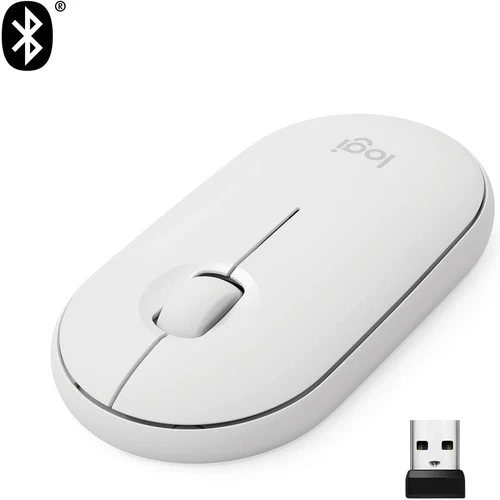

Logitech M350 Wireless Mouse | Silent Clicks, Bluetooth, Compact | Kenya
KSh5,500
Key Features
- Make any space minimalist, modern, and silent with Logitech Pebble
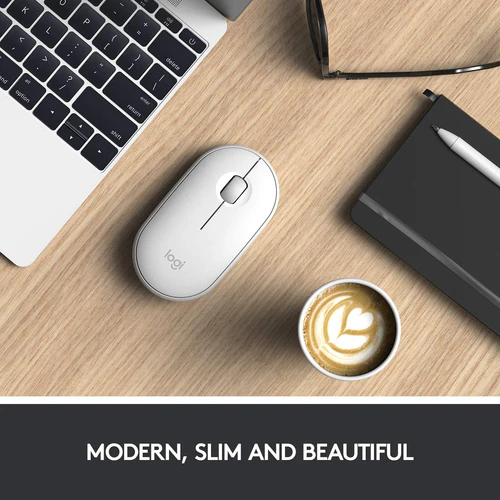
- Modern, Slim, and Beautiful
- Click and scroll in silence
- Connect simply with Bluetooth® or the tiny 2.4 GHz USB receiver -stored in the magnetic cover of the mouse- and never worry about annoying drop-offs or lag up to a 10m range.2
- Organic Shape, Natural Fit
- Work wherever life takes you
- 18 months battery life
- 1 Year Warranty
Introduction
The digital age has transformed the way we work, play, and communicate, making reliable accessories like the Logitech M350 Pebble Mouse kenya essential for both productivity and leisure. Whether you’re a student, a professional, or a casual user, having the right mouse can significantly enhance your experience with computers and laptops. This guide will help you understand why the Logitech M350 Pebble Mouse is a smart choice for Kenyans looking for a blend of style, functionality, and affordability.
In this comprehensive buying guide, we will cover everything you need to know about the Logitech M350 Pebble Mouse kenya. From its features and benefits to how it compares with competitors, we aim to provide you with the insights necessary to make an informed purchase. With a price point of KSh 5,500, this mouse is positioned as a premium product in the Kenyan market, making it crucial to understand its value and suitability for your needs.
What is the Logitech M350 Pebble Mouse?
The Logitech M350 Pebble Mouse is an innovative wireless mouse designed for modern users who value both aesthetics and performance. Launched by Logitech, a renowned brand in computer accessories, the M350 Pebble combines a sleek, minimalist design with advanced functionality, making it a popular choice among tech-savvy Kenyans.
This mouse is not just another accessory; it represents a shift towards more ergonomic and stylish computing solutions. With its compact size and lightweight build, the M350 Pebble is ideal for users on the go, whether commuting to school, working in a café, or simply enjoying a comfortable setup at home.
In the Kenyan market, where the demand for high-quality yet affordable tech products is ever-growing, the Logitech M350 Pebble Mouse kenya stands out for its reliability and performance. Its wireless capabilities mean you can enjoy a clutter-free workspace, while the long battery life ensures you won’t be constantly replacing batteries. This makes it a fitting choice for the dynamic lifestyles of Kenyan consumers.
Key Features and Benefits
The Logitech M350 Pebble Mouse is packed with features that enhance user experience and productivity. Here are some of its standout features and the benefits they offer:
- Sleek and Stylish Design: The M350 Pebble boasts a modern, minimalist aesthetic that appeals to users who appreciate clean lines and contemporary design. Available in various colors, it can complement any workspace.
- Wireless Connectivity: Utilizing Bluetooth technology, this mouse offers a wireless range of up to 10 meters, allowing you to work from a distance without the hassle of tangled wires. This feature is particularly useful in Kenyan settings where workspace flexibility is essential.
- Long Battery Life: With a battery life of up to 18 months on a single AA battery, the M350 Pebble ensures you can work without frequent interruptions for battery changes, making it a reliable choice for busy users.
- Quiet Clicks: The silent clicking feature is perfect for shared workspaces or library settings, allowing you to work without disturbing those around you. This is especially beneficial in Kenyan schools and offices where quiet environments are often required.
- Compact and Lightweight: Weighing just 100 grams, this mouse is easy to carry, making it ideal for students and professionals who are always on the move.
- Customizable Buttons: The M350 Pebble allows users to customize buttons for specific functions, enhancing productivity by enabling quick access to frequently used features. This is particularly useful for users in Kenya who engage in repetitive tasks, such as data entry or graphic design.
In summary, the Logitech M350 Pebble Mouse kenya is designed with the modern user in mind, offering a blend of style, comfort, and functionality that meets the demands of today’s fast-paced environment.
Models and Variants
The Logitech M350 Pebble Mouse comes in several models and color variants, catering to diverse user preferences. Here are some of the options available:
- Color Variants: The M350 Pebble is available in multiple colors, including Graphite, Rose, and Off-White. This variety allows users to choose a mouse that best fits their personal style or workspace aesthetics.
- Connectivity Options: While the primary model features Bluetooth connectivity, some variants may also come with a USB receiver, providing flexibility for users who may prefer a wired connection. This is particularly relevant in Kenya where some devices may not support Bluetooth.
- Special Editions: Occasionally, Logitech releases special editions of the M350 Pebble, which may feature unique colors or designs that appeal to collectors or those looking for something distinctive. These limited editions can be a great way to express individuality in a professional setting.
Choosing the right model of the Logitech M350 Pebble Mouse kenya can enhance your experience, so consider what color and connectivity options best suit your needs and preferences.
How to Choose the Right One
Selecting the right mouse can significantly impact your productivity and comfort. Here are some key factors to consider when choosing the Logitech M350 Pebble Mouse kenya:
1. Purpose of Use
Consider how you plan to use the mouse. Are you a student who needs it for note-taking and browsing? Or a professional who requires precision for graphic design? Understanding your primary use case will help you determine if the M350 Pebble is the right fit. For instance, students in Kenyan universities may find it beneficial for both academic and recreational use.
2. Connectivity Preferences
If you often switch between devices, consider the connectivity options. The M350 Pebble’s Bluetooth capability allows for seamless switching between devices, making it a versatile choice for users who work on multiple platforms. In Kenya, where many people use smartphones and tablets alongside laptops, this feature is particularly advantageous.
3. Design and Ergonomics
Comfort is key, especially for prolonged use. The M350 Pebble is designed to fit comfortably in your hand, but it’s wise to test it if possible. Ensure that it feels right for your grip style, whether you prefer palm, claw, or fingertip grip. Ergonomic design is crucial for Kenyan professionals who may spend long hours working on their computers.
4. Aesthetic Appeal
Given its variety of colors, choose a mouse that matches your personal style or office decor. A mouse is not just a tool; it can also be a reflection of your personality. In the Kenyan context, a stylish mouse can enhance your professional image during meetings or presentations.
5. Budget Considerations
At KSh 5,500, the Logitech M350 Pebble Mouse is a premium product. Ensure that it fits within your budget, but also consider the long-term value it offers in terms of durability and performance. In Kenya, where budget constraints are common, evaluating the cost-benefit ratio is essential.
6. Reviews and Recommendations
Before making a purchase, read reviews from other Kenyan consumers. Their experiences can provide valuable insights into the mouse’s performance and reliability in local conditions. Platforms like Jumia and Kilimall often feature customer reviews that can help you gauge the product’s reputation.
By considering these factors, you can confidently choose the right Logitech M350 Pebble Mouse kenya that meets your needs and enhances your computing experience.
Pros and Cons
Like any product, the Logitech M350 Pebble Mouse comes with its own set of advantages and disadvantages. Here’s a balanced assessment:
Pros:
- Stylish Design: The sleek, modern look makes it a great addition to any workspace.
- Quiet Operation: Ideal for quiet environments, allowing you to work without disturbing others, which is particularly important in shared Kenyan workspaces.
- Long Battery Life: The extended battery life reduces the hassle of frequent replacements, which is beneficial for users in remote areas of Kenya where access to stores may be limited.
- Compact Size: Its lightweight and portable design make it easy to carry around, perfect for students commuting to class or professionals on the go.
- Customizable Features: Ability to customize buttons enhances productivity for specific tasks, making it a versatile tool for various user needs.
Cons:
- Price Point: At KSh 5,500, it may be considered expensive for some consumers, especially in comparison to basic models available in the Kenyan market.
- Limited Advanced Features: While it’s perfect for everyday use, it may lack advanced features needed by gamers or graphic designers, who may prefer specialized devices.
- Battery Dependency: While it has a long battery life, being reliant on batteries can be a drawback for some users, particularly in regions where batteries may not be easily available.
Understanding these pros and cons can help you make a more informed decision about whether the Logitech M350 Pebble Mouse kenya is the right choice for you.
vs Top Competitors
When considering the Logitech M350 Pebble Mouse, it’s important to compare it with its competitors in the Kenyan market. Here’s how it stacks up against some popular alternatives:
1. Microsoft Surface Mouse
Similar in design and functionality, the Microsoft Surface Mouse offers a sleek look and Bluetooth connectivity. However, it is often priced higher than the M350 Pebble, making the Logitech a more budget-friendly option. For Kenyan users looking for value without compromising on quality, the M350 Pebble is a compelling choice.
2. HP Z3700 Wireless Mouse
The HP Z3700 is another stylish wireless mouse that competes directly with the M350 Pebble. While it has a similar aesthetic, users often cite the Logitech’s better battery life and quieter operation as advantages. Additionally, the HP Z3700 may not be as readily available in local stores compared to the Logitech model.
3. Dell WM126 Wireless Mouse
The Dell WM126 is an economical choice that offers basic functionality. However, it lacks the premium design and quiet features of the M350 Pebble, making it less appealing for users who prioritize aesthetics and performance in their devices.
4. Anker Ergonomic Vertical Mouse
For those looking for ergonomic options, the Anker Vertical Mouse offers a different design aimed at reducing wrist strain. While it excels in comfort, it does not offer the same portability or style as the M350 Pebble. This makes the Logitech a more versatile option for users who require a balance of comfort and design.
In conclusion, the Logitech M350 Pebble Mouse kenya holds its own against competitors by offering a stylish design, excellent battery life, and quiet operation, making it a top choice for many consumers.
Tips for Maximum Value
To get the most out of your Logitech M350 Pebble Mouse, consider the following tips:
- Regular Cleaning: Keep your mouse clean to ensure smooth operation. Use a soft cloth to wipe down the surface regularly to maintain its aesthetic appeal and functionality.
- Battery Management: To maximize battery life, always turn off the mouse when not in use. Consider using rechargeable batteries for sustainability, which is an important aspect for environmentally conscious consumers in Kenya.
- Customization: Take advantage of the customizable buttons to streamline your workflow. Assign functions that you use frequently to save time, especially if you engage in repetitive tasks.
- Software Updates: Keep the Logitech software updated to benefit from the latest features and improvements. This can enhance your user experience and ensure compatibility with new devices.
- Use a Mouse Pad: A good quality mouse pad can enhance tracking accuracy and protect the mouse from wear and tear, which is particularly important in dusty environments.
By following these tips, you can ensure that your Logitech M350 Pebble Mouse kenya provides maximum value for your investment.
Frequently Asked Questions
1. Is the Logitech M350 Pebble Mouse compatible with all devices?
Yes, the Logitech M350 Pebble Mouse is compatible with most devices that support Bluetooth connectivity, including laptops, tablets, and desktops across various operating systems. This versatility makes it an excellent choice for users in Kenya who use multiple devices.
2. How long does the battery last?
The M350 Pebble boasts an impressive battery life of up to 18 months on a single AA battery, making it a reliable choice for long-term use. This feature is particularly beneficial for users in Kenya where access to replacement batteries may not always be convenient.
3. Can I use it for gaming?
While the M350 Pebble is primarily designed for everyday computing tasks, it may not be suitable for competitive gaming due to its lack of advanced features like adjustable DPI settings. Gamers in Kenya may want to consider specialized gaming mice for enhanced performance.
4. How do I connect it to my device?
To connect the Logitech M350 Pebble Mouse kenya, simply turn it on, enable Bluetooth on your device, and select the mouse from the list of available devices to pair it. This straightforward process makes it easy for users in Kenya to get started quickly.
5. What is the warranty period for the Logitech M350?
The Logitech M350 Pebble Mouse typically comes with a limited warranty of 1 year, which covers manufacturing defects and issues under normal usage conditions. This warranty provides peace of mind for consumers investing in this premium product.
6. Can I customize the buttons on the mouse?
Yes, the M350 Pebble allows users to customize its buttons using Logitech’s software, enabling you to assign specific functions for improved productivity. This feature is particularly useful for users in Kenya who want to enhance their workflow efficiency.
7. Is it suitable for left-handed users?
The Logitech M350 Pebble Mouse is designed for right-handed users, but its symmetrical shape makes it usable for left-handed individuals as well. This inclusivity is an important consideration for a diverse user base.
Troubleshooting Guide
If you encounter issues with your Logitech M350 Pebble Mouse, here are some common problems and their solutions:
- Mouse Not Connecting: Ensure that Bluetooth is enabled on your device and that the mouse is turned on. If it still doesn’t connect, try removing the mouse from your device’s Bluetooth settings and re-pairing it.
- Battery Issues: If the mouse is not responding, check if the battery needs to be replaced. If you are using rechargeable batteries, ensure they are fully charged.
- Cursor Movement is Erratic: This could be due to surface interference. Try using the mouse on a different surface or invest in a quality mouse pad to improve tracking.
- Buttons Not Responding: If the customizable buttons are not functioning as expected, check the Logitech software settings to ensure they are programmed correctly.
- Mouse is Too Slow or Fast: Adjust the pointer speed in your device’s settings. If the mouse has a DPI setting, consider changing it to suit your preferences.
Final Verdict
In conclusion, the Logitech M350 Pebble Mouse kenya is an excellent choice for anyone in search of a stylish, functional, and reliable mouse. With its impressive features, including long battery life, quiet operation, and customizable buttons, it stands out in the competitive landscape of computer accessories.
For KSh 5,500, you are investing in a premium product that enhances your computing experience, whether for work, study, or leisure. We highly recommend considering the Logitech M350 Pebble Mouse as your next mouse upgrade. Don’t miss out on the opportunity to elevate your workspace with this exceptional accessory!
Make your purchase today and experience the difference that the Logitech M350 Pebble Mouse kenya can make in your daily tasks!
Alternative Products
- Logitech M720 Wireless Mouse | Hyper-Fast Scrolling, Multi-Device | Kenya - KSh7,500
- Logitech M185 Wireless Mouse | Plug & Play, 12-Month Battery Life | Kenya - KSh2,800
- Logitech MX Master 3S Wireless Mouse | Ergonomic, 8K DPI, Multi-Device | Kenya - KSh15,000
- Logitech M196 Wireless White Mouse | Compact, Plug & Play | Kenya - KSh3,000
- Logitech MX Anywhere 3S Wireless Mouse | 8K DPI, MagSpeed Scroll, Compact | Kenya - KSh13,500
Related products
Reviews
There are no reviews yet.