
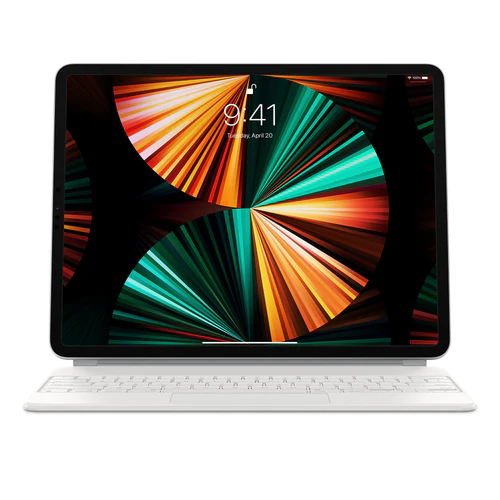
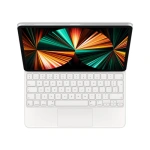
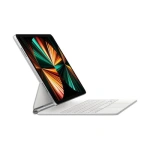
Apple Magic Keyboard 12,9”
KSh 37,910.00
Apple Magic Keyboard 12,9” Key Features
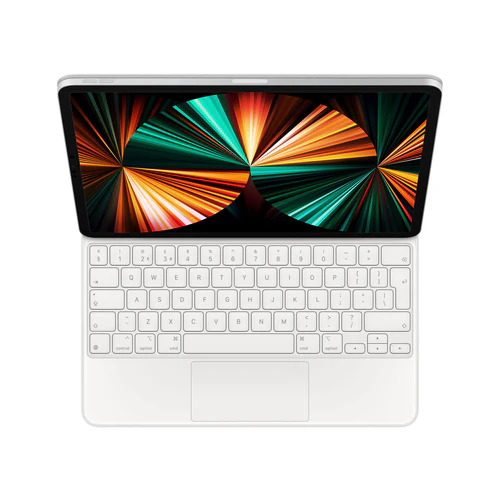
- Special Feature: Ergonomic, Backlit, Integrated Stand, Foldable, Trackpad
- Connectivity: Bluetooth, Smart Connector, USB-C
- Display: 12.9 inches
- Number of Keys: 64
- Colors: White
- OS: iPadOS 14.5 or later
Apple Magic Keyboard 12.9” Review by Cytech Digitals: Pros, Cons & Features
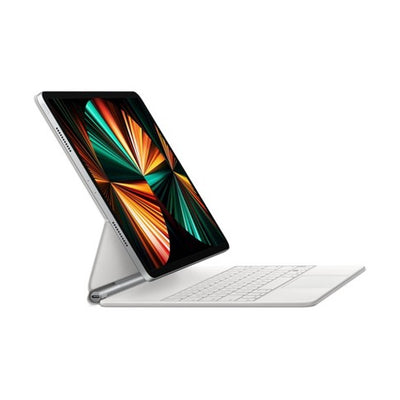
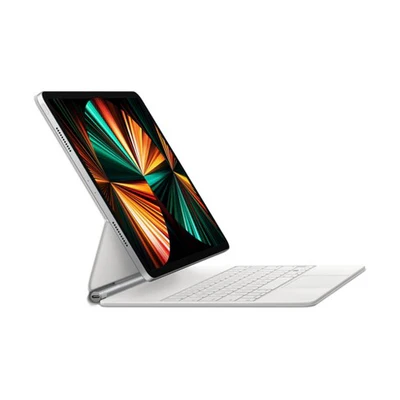
As of 2025, the Magic Keyboard for iPad Pro 12.9-inch is priced at KSh 36,000 in Kenya. This premium keyboard is not just a typing accessory; it transforms your iPad Pro into a versatile workstation. With an exceptional typing experience, a built-in trackpad that enhances productivity with iPadOS, a USB-C port for convenient pass-through charging, and robust protection for your device, the Magic Keyboard is designed for both functionality and style. Its innovative floating cantilever design allows you to magnetically attach your iPad Pro and adjust it to your preferred viewing angle seamlessly.
Magic Keyboard for iPad Pro 12.9 6th Gen Highlights
- Comfortable backlit keys and a scissor mechanism with 1 mm travel for quiet, responsive typing.
- Designed for Multi-Touch gestures and the cursor in iPadOS, making navigation intuitive.
- Smooth angle adjustability delivers the perfect viewing angle, enhancing ergonomics.
- USB-C port for charging iPad Pro, freeing up the port on the iPad for other accessories.
- Folds into a case to provide front and back protection for traveling with iPad Pro.
Compatibility iPad Models
- iPad Pro 12.9-inch (6th generation)
- iPad Pro 12.9-inch (5th generation)
- iPad Pro 12.9-inch (4th generation)
- iPad Pro 12.9-inch (3rd generation)
Why Choose the Apple Magic Keyboard?
The Apple Magic Keyboard is designed for the modern user who demands both functionality and style. Here’s why it stands out:
- Ergonomic Design: The floating design not only looks sleek but also allows for an adjustable viewing angle that can help reduce neck strain during long typing sessions. This is particularly beneficial for users who spend extended hours working on their iPads.
- Enhanced Productivity: The inclusion of a trackpad allows users to navigate iPadOS with ease, making it a great tool for multitasking. You can easily switch between apps, scroll through documents, and more without needing to reach for the screen, thereby increasing your overall efficiency.
- Durability: The keyboard’s robust build ensures it can withstand the rigors of daily use, while the protective case feature adds an extra layer of security when traveling. This durability makes it a reliable choice for students, professionals, and travelers alike.
- Seamless Integration: With iPadOS continually evolving, the Magic Keyboard takes full advantage of new features and updates, ensuring that users benefit from the latest enhancements Apple has to offer. This future-proofing is essential in a fast-paced technological landscape.
Key Features of the Apple Magic Keyboard
1. Backlit Keys
The backlit keys of the Magic Keyboard are a game-changer for those who work in low-light conditions. The adjustable brightness ensures that you can see your keys clearly, enhancing typing accuracy and comfort. This feature is particularly useful for students studying late at night or professionals who often work in dimly lit environments.
2. Scissor Mechanism
The scissor mechanism beneath each key provides stability and a responsive feel, making typing comfortable and enjoyable. With a travel distance of 1 mm, each keystroke feels satisfying, reducing fatigue during extended typing sessions. This design mimics the feel of traditional laptop keyboards, offering a familiar typing experience.
3. Multi-Touch Gestures
With support for Multi-Touch gestures, the Magic Keyboard allows users to perform a range of actions with simple finger movements. This feature is particularly useful for navigating through apps, scrolling through documents, and managing multiple tasks efficiently. Users can swipe between apps or pinch to zoom, enhancing the overall user experience.
4. USB-C Charging
The USB-C port not only charges your iPad Pro but also frees up the iPad’s ports for other accessories. This is especially beneficial for users who need to connect external devices like storage drives or displays. The convenience of pass-through charging means you can keep working without interruptions.
5. Protective Case Functionality
When not in use, the Magic Keyboard folds into a compact case, providing front and back protection for your iPad Pro. This is crucial for users who travel frequently, ensuring that their device remains safe from scratches and impacts. The lightweight design makes it easy to carry, fitting snugly into most bags.
Pricing Analysis and Value Proposition in Kenya
The current price of the Apple Magic Keyboard for iPad Pro 12.9-inch in Kenya is KSh 36,000. When considering the investment, it’s essential to weigh the benefits against the cost. Here’s a breakdown:
- Quality and Durability: The Magic Keyboard is built to last, making it a worthwhile investment for professionals and students alike. The premium materials used in its construction ensure longevity, reducing the need for frequent replacements.
- Enhanced Functionality: The combination of a keyboard and trackpad in one device significantly improves productivity, especially for users who rely on their iPad for work or study. This dual functionality eliminates the need to purchase separate accessories, offering better value for money.
- Resale Value: Apple products generally maintain a good resale value, meaning that if you decide to upgrade in the future, you can recoup a portion of your investment. This is particularly relevant in the Kenyan market, where Apple products are highly sought after.
Competitor Comparison
While the Apple Magic Keyboard is a top choice, it’s essential to consider alternatives available in the Kenyan market:
1. Logitech Combo Touch
The Logitech Combo Touch offers a detachable keyboard and a built-in trackpad, similar to the Magic Keyboard. Priced around KSh 25,000, it provides excellent value for those looking for a versatile option. However, it lacks the premium feel and seamless integration that Apple products offer, which may be a significant drawback for some users.
2. Brydge 12.9 Pro+
The Brydge 12.9 Pro+ is another competitor, priced at approximately KSh 30,000. It features a similar design and typing experience but may not offer the same level of build quality and reliability as the Magic Keyboard. Users looking for a more traditional laptop-like experience might find this option appealing, but it may fall short in terms of features.
3. Smart Keyboard Folio
Apple’s own Smart Keyboard Folio is a more budget-friendly option at around KSh 20,000. While it provides a good typing experience, it lacks the trackpad and backlighting features, making it less versatile for users who need those functionalities. It’s a suitable choice for casual users who prioritize portability over enhanced features.
Use Cases: How the Magic Keyboard Enhances Productivity in Kenya
Understanding how the Magic Keyboard fits into specific use cases can help potential buyers see its value:
1. Students
For students at universities like the University of Nairobi or Kenyatta University, the Magic Keyboard transforms the iPad Pro into a powerful tool for taking notes, writing essays, and conducting research. The backlit keys and trackpad make it easier to work in various lighting conditions, whether in a library or a café. The ergonomic design also supports long study sessions, reducing strain on the wrists and neck.
2. Professionals
Professionals working in fields such as graphic design or content creation can benefit from the Magic Keyboard’s ergonomic design and Multi-Touch gestures, allowing for efficient navigation through design software and document editing. The keyboard’s responsive keys and trackpad facilitate quick edits and adjustments, making it ideal for those who require precision in their work.
3. Travelers
For business travelers, the compact design and protective case functionality make the Magic Keyboard an ideal companion. It allows for easy setup in airports or hotels, enabling users to work on the go without sacrificing comfort or productivity. The lightweight nature of the keyboard ensures that it won’t add significant bulk to your luggage, making it a practical choice for frequent travelers.
Buying Criteria: What to Consider Before Purchasing
When considering the purchase of the Apple Magic Keyboard, keep the following factors in mind:
- Compatibility: Ensure that your iPad model is compatible with the Magic Keyboard. It supports the 12.9-inch iPad Pro (3rd to 6th generation), so check your device before purchasing.
- Typing Needs: Assess your typing habits and whether you require backlit keys and a trackpad for your workflow. If you often work in low-light conditions or need precise navigation, these features will significantly enhance your experience.
- Budget: Consider your budget against the features offered by the Magic Keyboard and its competitors. While it is a premium product, evaluate if the investment aligns with your usage requirements.
- Usage Environment: Think about where you will primarily use the keyboard. If you often work in low-light conditions, the backlit keys will be a significant advantage. Additionally, consider if you need portability for on-the-go use.
FAQs about the Apple Magic Keyboard
1. Is the Magic Keyboard worth the price?
Yes, the Magic Keyboard is considered worth the investment due to its premium build quality, enhanced productivity features, and seamless integration with iPadOS. Users report significant improvements in their workflow and comfort, making it a valuable accessory for those who use their iPad Pro regularly.
2. Can I use the Magic Keyboard with other iPad models?
The Magic Keyboard is specifically designed for the 12.9-inch iPad Pro models. It is not compatible with other iPad sizes, so ensure that you have the correct model before making a purchase.
3. How do I clean my Magic Keyboard?
To clean your Magic Keyboard, use a soft, lint-free cloth lightly dampened with water or a mild cleaning solution. Avoid getting moisture in any openings. Regular cleaning helps maintain the keyboard’s appearance and functionality.
4. What should I do if my Magic Keyboard is not connecting?
If your Magic Keyboard is not connecting, ensure that Bluetooth is enabled on your iPad and that the keyboard is charged. If the issue persists, try restarting both devices. Additionally, check for any software updates that might affect connectivity.
5. Does the Magic Keyboard have a battery life?
The Magic Keyboard features a built-in rechargeable battery that can last for about a month on a single charge, depending on usage. This long battery life means you can use it extensively without worrying about frequent charging.
Maintenance Tips for the Magic Keyboard
- Regular Cleaning: Keep the keyboard clean by regularly wiping it down to prevent dust and debris buildup. This will help maintain its functionality and appearance over time.
- Battery Management: Ensure that the keyboard is charged regularly to maintain optimal performance. Avoid letting the battery drain completely, as this can affect its longevity.
- Software Updates: Keep your iPad updated to the latest iPadOS version to ensure compatibility and access to new features. Regular updates can enhance the performance of both the iPad and the Magic Keyboard.
Conclusion
The Apple Magic Keyboard for iPad Pro 12.9-inch is a powerful accessory that enhances the functionality of your iPad. With its premium features, ergonomic design, and seamless integration with iPadOS, it is an excellent investment for students, professionals, and travelers alike. At KSh 36,000, it offers a compelling value proposition for those looking to elevate their iPad experience. Whether you are typing essays, creating presentations, or navigating through complex apps, the Magic Keyboard is designed to meet your needs. With its blend of style, functionality, and durability, it stands out as a top choice in the Kenyan market for anyone seeking to maximize their productivity with an iPad Pro.
Alternative Products
- IPAD SMART KB FOLIO A2038 - KSh 27,360.00
- IPad Magic Keyboard 13″ - KSh 48,840.00
- Apple TV 4K 3rd Gen - KSh 20,915.00
- Apple Pencil USB-C - KSh 14,640.00
- Apple Magic Trackpad Type c - KSh 23,500.00
| RAM / ROM | 4/128GB |
|---|
Related products

Apple iPhone 13 128/256GB 5G – Brand New
Apple iPhone 15 Pro 128/256GB 5G – Brand New

Apple iPhone 16 Pro Max 256/512/1TB 5G – Brand New


iPhone 13 Pro 256GB (EX-UK) | 95%+ Battery | Excellent Condition | 5G | 1 Yr Warranty | Cytech Digitals

iPhone 13 Pro Max 128GB (EX-UK) | 95%+ Battery | Excellent Condition | 5G | 1 Yr Warranty | Cytech Digitals
